Lesson 1: The AI Coding Assistant Landscape
Listen to this lesson
Lesson 1: The AI Coding Assistant Landscape
Estimated reading time: 8 minutes
From Chat to Code: A Different Kind of AI Tool
You've probably already used ChatGPT or Claude to help you write code. You paste in a problem, get some code back, copy it into your editor, and see if it works. That's a perfectly valid workflow — and if you've been doing that, you're already ahead of most people.
But there's a whole category of tools designed to go further. AI coding assistants don't just generate code in a chat window — they live inside your development environment, understand your project's context, and can write, edit, and refactor code directly in your files.
The difference matters more than you might think.
What Makes a Coding Assistant Different from Chat-Based AI?
When you use a chat-based AI for coding, you're essentially doing manual integration. You describe your problem, get a response, then manually move that code into your project. The AI doesn't see your file structure, doesn't know what libraries you're using, and can't read the function three files over that your new code needs to interact with.
AI coding assistants change this equation in several ways:
Context awareness. They can read your open files, your project structure, and sometimes your entire codebase. When they suggest code, it's informed by what already exists — your naming conventions, your imports, your patterns.
Direct integration. Instead of copying and pasting, suggestions appear inline as you type, or edits are applied directly to your files. The friction between "AI generates code" and "code is in my project" drops to nearly zero.
Continuous assistance. Rather than a back-and-forth conversation, many of these tools work passively — offering completions as you type, flagging issues, or suggesting refactors without you having to ask.
Workflow integration. The best tools connect to your version control, your terminal, your tests. They don't just write code; they help you ship it.
The Current Landscape (Updated March 2026)
The AI coding assistant space continues to evolve rapidly. As of March 2026, several significant shifts have reshaped the landscape:
Free tier disruption. LogRocket's March 2026 Power Rankings placed Antigravity at #2 with a revolutionary free pricing model supporting Claude Opus 4.5, Gemini 3 Flash, and GPT-OSS — models that were previously paywalled behind expensive subscriptions. This fundamentally changed the economics of AI-assisted coding for individual developers and startups.
OpenAI's return to agents. OpenAI's Codex re-entered the top 5 in March 2026 as a cloud-native coding agent featuring parallel sandboxed execution and deep GitHub integration. Unlike the original Codex (which was discontinued), this version is built for autonomous development workflows rather than just inline completions, with the ability to execute code safely in isolated environments.
Cursor's consolidation of leadership. Ryz Labs named Cursor the best AI coding assistant for 2026 due to its combination of accuracy, contextual awareness, and competitive pricing at US$20/month. Its Claude integration provides full codebase access enabling remarkably accurate suggestions across large projects — particularly strong for refactoring existing codebases where understanding the whole picture matters. Market milestone: In early 2026, Cursor surpassed $2 billion in annualized revenue — a significant milestone that validates mainstream adoption of AI-native coding tools and signals that vibe coding has moved from niche experiment to industry standard. The market is now splitting rather than converging — different tools targeting different parts of the developer stack based on workflow needs rather than raw model capability alone. This trend suggests we'll see continued differentiation rather than winner-take-all consolidation in the AI coding space.
The enterprise angle. While Antigravity's free tier attracts individuals, enterprise teams are increasingly choosing Cursor or Windsurf for their collaborative features and better IDE integrations. The choice now depends more on team size and workflow than raw model capability.
With those shifts in mind, here's a map of the major categories:
Inline Completion Tools
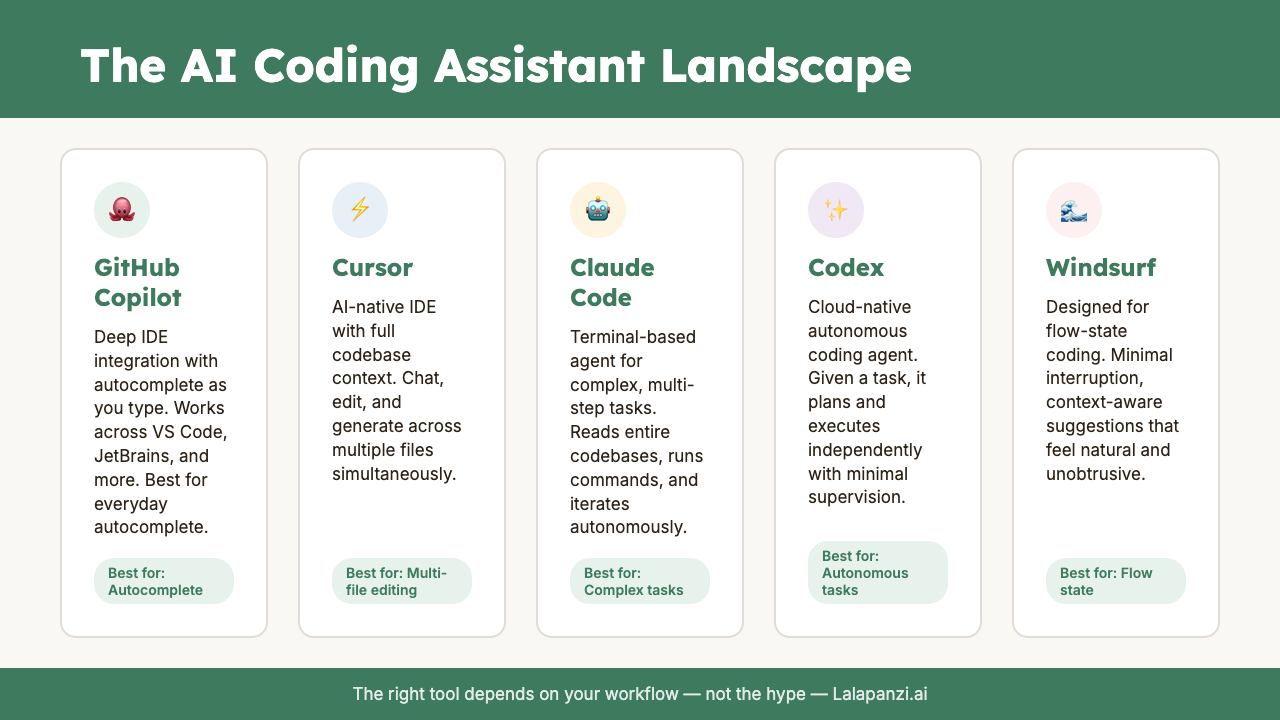
These sit in your editor and suggest code as you type — like autocomplete on steroids. GitHub Copilot pioneered this approach and remains the most well-known. You start typing a function, and it suggests the rest. You press Tab to accept, or keep typing to ignore it.
AI-Native IDEs
Rather than adding AI to an existing editor, these tools rebuilt the entire editor experience around AI. Cursor and Windsurf are the main players here. They look and feel like VS Code (they're actually built on the same foundation), but AI is woven into every interaction — from writing code to navigating your project to understanding large codebases.
Terminal-Based Agents
These run in your command line and can autonomously write code, create files, run commands, and iterate on errors. Claude Code is the standout here. You describe what you want in plain language, and it goes off and builds it — reading your codebase, making changes across multiple files, running tests, and fixing what breaks.
2026 evolution: agentic systems. In 2026, AI coding assistants have evolved beyond simple autocomplete into "Agentic Systems" capable of autonomous multi-step reasoning across entire repositories. Modern tools like Codex now feature parallel sandboxed execution and automatic PR creation — moving from helper tools to semi-autonomous development partners that can work independently on well-defined tasks while maintaining code quality and safety standards.
Cloud-Based Coding Environments
Tools like Replit AI and GitHub Codespaces (with Copilot) give you AI-assisted coding entirely in the browser. No local setup required. These are particularly appealing if you're working across devices or want a low-friction way to start building.
Specialised and Enterprise Tools
Amazon CodeWhisperer (now Amazon Q Developer), Google's Gemini Code Assist, and various open-source options target specific ecosystems or enterprise needs. They're worth knowing about, especially if you work within those platforms.
How These Tools Actually Work (Briefly)
Under the hood, most AI coding assistants use large language models — the same fundamental technology behind ChatGPT and Claude. The difference is in how they're deployed and what context they're given.
When you type in an editor with Copilot enabled, it sends your current file (and sometimes neighbouring files) to a model that predicts what should come next. When Claude Code reads your entire project before making changes, it's building a rich context window that helps it make decisions consistent with your codebase.
The model matters — tools using more capable models generally produce better results. But context management often matters more. A slightly less capable model with full project context will frequently outperform a frontier model that only sees the 20 lines around your cursor.
This is why the tool layer matters so much. The AI model is the engine, but the coding assistant is the entire vehicle — steering, navigation, and all.
The Honest Assessment
These tools are genuinely useful. They can save you hours on repetitive code, help you work in unfamiliar languages, and catch issues you might miss. But they're not magic, and it's worth being clear-eyed about what they can and can't do well.
What they're good at:
- Boilerplate and repetitive patterns
- Translating between languages and frameworks
- Generating tests for existing code
- Explaining unfamiliar code
- Scaffolding new projects quickly
What they struggle with:
- Complex architectural decisions
- Code that requires deep domain knowledge
- Security-critical implementations (always review)
- Novel algorithms or unusual patterns
- Understanding the business reason behind code
The best approach is to think of these tools as highly capable junior developers. They're fast, they know a lot of patterns, and they rarely make typos. But they need guidance, and you still need to review their work.
Why This Course Exists
Over the next five lessons, we're going to go deep on each of the major tools — Claude Code, GitHub Copilot, Cursor, Windsurf, and the broader ecosystem. For each one, you'll learn what it does well, where it falls short, and how to actually set it up and use it.
By the end, you'll have a clear framework for choosing which tools fit your workflow and skill level — because the right answer isn't the same for everyone.
Let's get into it.
Key Takeaways
- AI coding assistants are fundamentally different from chat-based AI — they integrate directly into your development environment and understand your project context.
- The landscape splits into several categories: inline completion (Copilot), AI-native IDEs (Cursor, Windsurf), terminal agents (Claude Code), and cloud environments (Replit).
- Context management often matters more than the underlying model — a tool that sees your whole project can outperform a better model with limited context.
- These tools excel at repetitive patterns and boilerplate but still need human oversight for architecture, security, and business logic.
- There's no single "best" tool — the right choice depends on your workflow, skill level, and what you're building.
Practical Exercise
Tool Audit: Take stock of how you currently use AI for coding. Write down:
- Which AI tools you currently use (even if it's just ChatGPT)
- Your typical workflow — how does code get from AI to your project?
- The biggest friction points in that workflow
- What you wish AI could do better for your coding
Keep these notes — you'll refer back to them in Lesson 6 when we build your personalised tool stack.
Quiz
1. What is the primary advantage of an AI coding assistant over using a chat-based AI for coding?
a) AI coding assistants use more powerful models b) AI coding assistants can understand your project context and integrate directly into your workflow c) Chat-based AI cannot generate code at all d) AI coding assistants are always free to use
Answer: b) — The key differentiator is context awareness and direct integration into your development environment, not necessarily the underlying model.
2. Which category of AI coding tool works by running in your terminal and autonomously making changes across multiple files?
a) Inline completion tools b) AI-native IDEs c) Terminal-based agents d) Cloud-based coding environments
Answer: c) — Terminal-based agents like Claude Code operate from the command line and can autonomously navigate, edit, and test code across your project.
3. When evaluating AI coding assistants, which factor often matters more than the underlying AI model?
a) The price of the subscription b) How the tool manages and provides context to the model c) The colour scheme of the interface d) How many programming languages the tool supports
Answer: b) — Context management — how much of your project the tool can see and how it presents that information to the model — frequently matters more than raw model capability.
Visual overview