Module 6, Lesson 1: Privacy — What Happens to the Data You Share with AI Tools
Listen to this lesson
Module 6, Lesson 1: Privacy — What Happens to the Data You Share with AI Tools
Estimated reading time: 8 minutes
What You'll Learn
Every time you type something into an AI tool, you're sharing data. Sometimes that's completely fine — asking ChatGPT to help you write a birthday card isn't going to cause problems. But when you start pasting in customer emails, financial figures, medical notes, or internal strategy documents, the stakes change considerably.
This lesson is about understanding where your data goes, what happens to it, and how to make informed choices about what you share.
The Basics: How AI Tools Handle Your Data
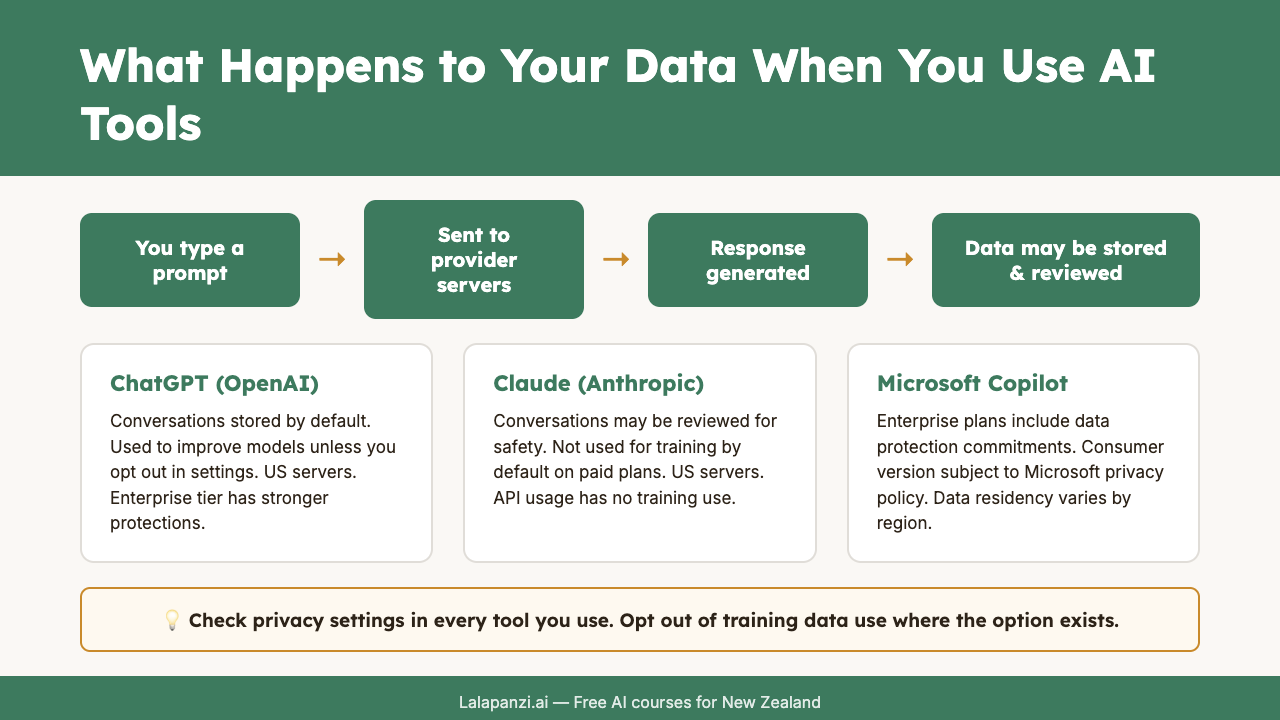
When you type a prompt into a tool like ChatGPT, Claude, or Gemini, your input travels over the internet to the provider's servers. There, the AI model processes your prompt and generates a response. Simple enough. But what happens to your input after that?
The answer depends on the provider, the plan you're on, and sometimes the specific settings you've chosen. Here are the key questions to ask:
1. Is my data used to train future models?
This is the big one. Many AI providers, particularly on their free tiers, reserve the right to use your conversations to improve their models. That means the text you type in could, in some form, influence how the AI responds to other people in the future.
OpenAI's free and Plus tiers of ChatGPT, for example, use your conversations for training by default — though you can opt out in settings. Their Enterprise and API plans don't use your data for training. Anthropic (Claude) and Google (Gemini) have similar distinctions between consumer and business tiers.
The practical implication: If you're on a free plan and you paste in your company's quarterly revenue figures, that data may become part of a training dataset. It's unlikely to be reproduced verbatim in someone else's conversation, but "unlikely" isn't the same as "impossible."
2. How long is my data stored?
Most providers store your conversation history so you can return to it later. That's a feature, not a bug — until you consider that stored conversations sitting on someone else's servers represent a potential data breach risk.
Retention policies vary. Some providers let you delete conversations. Some automatically purge data after a set period. Some keep it indefinitely. Check the specific terms for any tool you're using regularly.
3. Where are the servers?
This matters more than people realise. Most major AI providers run their infrastructure in the United States. Some also have servers in Europe, Asia, or Australia. Very few have servers in New Zealand.
Why does this matter? Because when your data crosses borders, it becomes subject to the laws of wherever it lands. Data stored on US servers can potentially be accessed under US law enforcement requests, even if you're a New Zealand citizen or business. For organisations handling sensitive data — particularly in healthcare, legal, or government contexts — this is a significant consideration.
4. Who else can see my conversations?
On most platforms, the provider's employees generally don't read your conversations as a matter of course. But there are exceptions. Conversations may be reviewed for safety and policy compliance. If you flag a conversation or report a problem, a human may review it. And in some cases, conversations are reviewed by human annotators as part of quality assurance processes.
If you're using a workplace account managed by your employer, your IT administrator may also have visibility over your usage.
What This Means in Practice
Let's make this concrete. Here's a simple framework for thinking about what to share:
Low risk — generally fine to share:
- Generic writing tasks (help me draft an email about a meeting time change)
- Public information (summarise this Wikipedia article)
- Learning and exploration (explain how photosynthesis works)
- Creative tasks (help me brainstorm names for a community event)
Medium risk — think before sharing:
- Internal but non-sensitive work documents
- General business processes or workflows
- Anonymised data or aggregated statistics
High risk — be very careful:
- Personal information about identifiable individuals (customers, patients, students)
- Financial data, trade secrets, or intellectual property
- Legal documents or privileged communications
- Health information
- Anything covered by a confidentiality agreement
Do not share:
- Passwords, API keys, or access credentials
- Highly classified or legally protected information
- Data you don't have permission to share with third parties
Practical Steps to Protect Privacy
Here are things you can actually do right now:
1. Check your settings. Most AI tools have a privacy or data settings page. Look for options to opt out of training data collection. On ChatGPT, go to Settings → Data Controls → Improve the model for everyone. Turn it off if you're discussing anything sensitive.
2. Anonymise before you paste. If you need AI help with a document that contains personal information, take 30 seconds to replace real names, addresses, and identifying details with placeholders. "Dear [Customer Name], regarding your account [XXXXX]..." works just as well for getting writing help.
3. Use business tiers for business work. If your organisation is using AI tools regularly, invest in business or enterprise plans. They typically come with stronger data protection commitments, no training data usage, and sometimes data residency options.
4. Read the terms. Yes, really. You don't need to read every word, but find the sections on data usage, data retention, and third-party sharing. If a tool's terms make you uncomfortable, use a different tool.
5. Think of it like email. A useful mental model: treat AI chat inputs with the same caution you'd treat an email to someone outside your organisation. If you wouldn't email it to an external consultant, think twice before pasting it into an AI tool.
The Bigger Picture
Privacy in AI isn't just about protecting yourself — it's about protecting the people whose data you handle. If you're a manager and you paste an employee's performance review into ChatGPT for help rewriting it, you've just shared that person's personal information with a third party. They didn't consent to that.
This is especially important in Aotearoa New Zealand, where the Privacy Act 2020 sets clear expectations about how personal information is collected, used, and disclosed. We'll explore the Privacy Act in detail in Module 7, but the core principle is simple: personal information should only be used for the purpose it was collected for, and sharing it with an AI tool probably wasn't what the person had in mind.
Being thoughtful about privacy isn't about being paranoid. It's about being professional. The people who use AI most effectively are the ones who understand exactly what they're sharing and make deliberate choices about it.
New Transparency Rules: What's Changing in 2026
The regulatory landscape is catching up with AI. As of 2 August 2026, the EU AI Act's transparency obligations are now in effect. These rules require:
- Chatbots and interactive AI systems must inform users they are interacting with AI, not a human, from the first interaction.
- Deepfake content (AI-generated or AI-edited images, video, or audio) must be labelled as artificially generated.
- AI-generated text published on topics of public interest must be marked as AI-produced.
- Emotion recognition and biometric categorisation systems must disclose their use to exposed individuals.
While these rules apply within the EU, they affect any NZ business whose AI-generated content reaches European audiences. More importantly, they set a benchmark that other jurisdictions — including New Zealand — are watching closely. New Zealand's own approach to AI regulation has been deliberately "light-touch and principles-based," with the government focusing on removing legislative barriers to AI adoption rather than introducing new AI-specific laws. The existing Privacy Act 2020 and sector-specific regulations remain the primary framework, but businesses should expect increasing pressure — from both regulators and customers — to be transparent about AI use, even where it isn't strictly required by law.
Key Takeaways
- Your AI inputs are stored and may be used for training — especially on free tiers. Check your settings and opt out if needed.
- Data crosses borders. Most AI providers run servers in the US, which has implications for data sovereignty and legal access.
- Anonymise sensitive information before sharing it with any AI tool. Thirty seconds of redaction can prevent serious problems.
- Business and enterprise plans generally offer stronger privacy protections than free tiers.
- Protecting other people's data is your responsibility — not just your own. Think about consent before sharing personal information with AI.
Practical Exercise
Audit your AI privacy settings (15 minutes)
- Open every AI tool you currently use (ChatGPT, Claude, Gemini, Copilot, etc.).
- Navigate to the privacy or data settings for each one.
- For each tool, answer these questions:
- Is my data being used for model training? Can I opt out?
- How long are my conversations stored?
- Can I delete my conversation history?
- Where are the servers located?
- Write a brief summary of what you found. Were there any surprises?
- Opt out of training data collection on any tools where you discuss work or personal matters.
Knowledge Check
Question 1: You're using ChatGPT's free tier with default settings. You paste in a customer complaint email containing the customer's full name and address to help draft a response. What is the primary privacy concern?
A) The AI will email the customer directly B) Your input may be used for model training, and you've shared someone's personal information without their consent C) ChatGPT will publish the customer's details on its website D) The response will be less accurate because it contains personal data
Answer: B — On the free tier with default settings, your inputs may be used for training. More importantly, you've shared an identifiable person's information with a third party without their knowledge or consent.
Question 2: Which of the following is the most effective way to protect privacy when using AI tools for work tasks involving personal information?
A) Use incognito/private browsing mode B) Delete the conversation after you're done C) Anonymise the data before entering it into the AI tool D) Use a VPN
Answer: C — Anonymising data before sharing it prevents the personal information from ever reaching the provider's servers. Incognito mode, deleting conversations, and VPNs don't prevent the data from being processed and potentially stored by the provider.
Question 3: Your organisation has signed up for an enterprise AI plan that guarantees data won't be used for training. Does this mean you can freely paste any company data into the tool?
A) Yes — enterprise plans have full data protection so anything goes B) No — you should still consider data classification, what's appropriate to share with any third party, and whether specific data types have additional legal protections C) Yes — but only if your IT department has approved the specific tool D) No — enterprise plans are no different from free plans in terms of privacy
Answer: B — Enterprise plans offer stronger protections, but they don't eliminate all considerations. Some data may have legal restrictions (e.g., health information, privileged legal communications), and organisational data classification policies still apply.
Visual overview